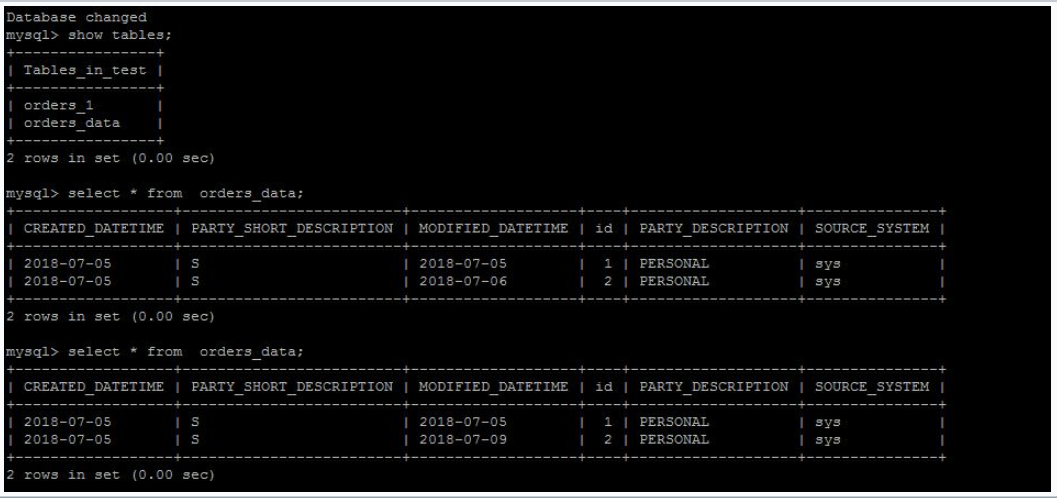
Steps to be followed
Step2
- Download confluent on each server using following command
$wget http://packages.confluent.io/archive/4.1/confluent-oss-4.1.0-2.11.tar.gz

$tar –xvf  confluent-oss-4.1.0-2.11.tar.gz'
Step3
- Start the zookeeper on each server using following command.
- Go to the bin location of confluent(form me it’s in root)
$cd /root/confluent-4.1.0/bin

$./zookeeper-server-start  ../etc/kafka/zookeeper.properties
- If it is running on 2181 port then start it in daemon mode as follow
$ ./zookeeper-server-start -daemon ../etc/kafka/zookeeper.properties

$netstat -anp|grep 2181     (for checking, it is running or not)
Step4
Start the kafka server on each server.
Change the following parameters in
server.propertieson each server.It is resides into/root/confluent-4.1.0/etc/kafka/location.broker.id=0 (change for each server as 0,1,2) listeners=PLAINTEXT://hostname or ip address:9092 zookeeper.connect=x.x.x.x:2181,x.x.x.x:2181,x.x.x.x:2181(add other server ip with 2181 port)
Now start kafka server using following command
$ cd /root/confluent-4.1.0/bin

$./kafka-server-start  ../etc/kafka/server.properties
- If it running on port 9092 then again start it in daemon mode as follow
$./kafka-server-start -daemon ../etc/kafka/server.properties

$netstat -anp|grep 9092
Step5
- Check the cluster setup.
- Create a topic on one of the server.
$cd  /storage/confluent-4.1.0/

$./kafka-topics --create --zookeeper x.x.x.x:2181,x.x.x.x:2181,x.x.x.x:2181 -- replication-factor 1 --partitions 1 --topic demotopic
- You can check that topic is created on each server using following command
$./kafka-topics --list --zookeeper x.x.x.x:2181,x.x.x.x:2181,x.x.x.x:2181
It will list topic which is created.
- start the producer in the same terminal of topic
$./kafka-console-producer --broker-list x.x.x.x:9092,x.x.x.x:9092,x.x.x.x:9092 --topic demotopic
- Start the consumer on other two servers
$./bin/kafka-console-consumer --bootstrap-server x.x.x.x:9092,x.x.x.x:9092,x.x.x.x:9092 --topic demotopic --from-beginning
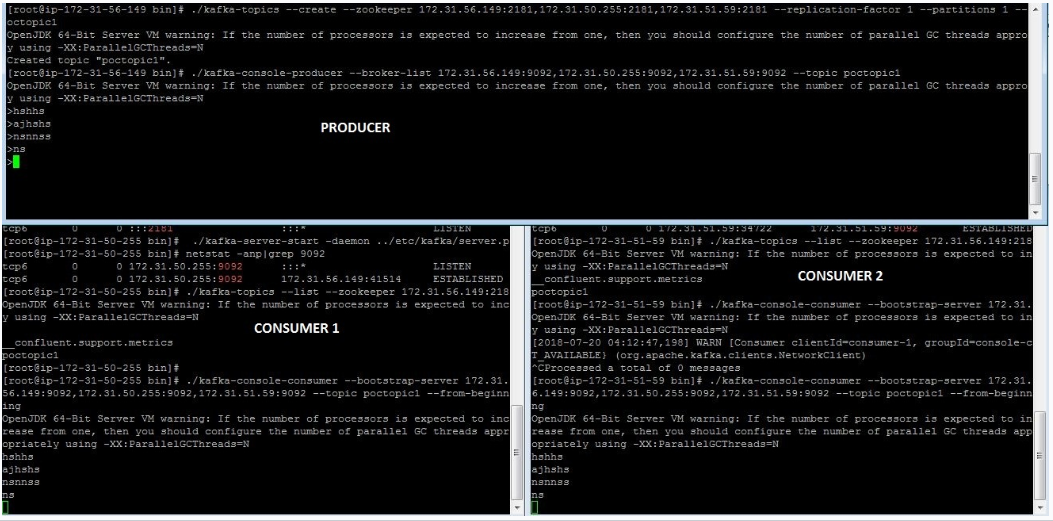
Now you can send the messages from producer and those messages get populated at consumers as follow
Step6
- Install mysql on one of the server and start the mysql service(login to root)
$yum install mysql-server

$service mysqld start

Step7
- Create mysql instance on aws and login to mysql instance as follow
$mysql –h <hostname of mysql instance> -u <username> -p <password>
- Download mysql-connector-java.jar and place it in confluent-4.1.0/share/java/kafka-connect-jdbc/
- For aws mysql connection download following package
$yum list|grep mysql

$wget http://repo.mysql.com/mysql-community-release-el7-5.noarch.rpm

$rpm  -ivh mysql-community-release-el7-5.noarch.rpm
- Set the classpath on one of the server where you want to run schema registry and connect- statndlone
$ export CLASSPATH=$CLASSPATH:.:/root/confluent-4.1.0/share/java/kafka-connect-jdbc/mysql-connector-java-               5.1.46.jar:/root/confluent-4.1.0/share/java/kafka-connect-jdbc/kafka-connect-jdbc-4.1.0.jar

$ export CLASSPATH=/usr/share/java/mysql-connector-java.jar:$CLASSPATH
Step8
- Start schema registry on same server where you set classpath
- Change <kafkastore.bootstrap.servers=PLAINTEXT://x.x.x.x:9092> in “/root/confluent-4.1.0/etc/schema-registry/schema-registry.properties” file.
- Start schema registry as follow
$cd /storage/confluent-4.1.0/bin

$./schema-registry-start ../etc/schema-registry/schema-registry.properties
If is is running on port 8081 then start it in daemon mode
$./schema-registry-start -daemon ../etc/schema-registry/schema-registry.properties

$netstat -anp|grep 8081
Change following parameter in “connect-avro-standalone.properties” file.
bootstrap.servers=x.x.x.x:9092rest.port=8083create a file at “/root/confluent-4.1.0/etc/kafka-connect-jdbc/sink-mysql-jdbc.properties” with bellow content
name=sink-mysql-insert-updateconnector.class=io.confluent.connect.jdbc.JdbcSinkConnectortasks.max=1topics=orders_dataconnection.url=jdbc:mysql://hostname:3306/test?user=test&password=testauto.create=trueinsert.mode=upsertpk.mode=record_valuepk.fields=id#key.serializer=org.apache.kafka.common.serialization.StringSerializer#key.converter=org.apache.kafka.connect.storage.StringConverterkey.converter=org.apache.kafka.connect.storage.StringConverter#value.converter=org.apache.kafka.connect.storage.StringConverter#key.serializer=io.confluent.kafka.serializers.KafkaAvroSerializer#value.serializer=io.confluent.kafka.serializers.KafkaAvroSerializerStart kafka standalone as follow
$cd /root/confluent-4.1.0/bin

$./connect-standalone  ../etc/schema-registry/connect-avro-standalone.properties  ../etc/kafka-connect-jdbc/sink-mysql-jdbc.properties
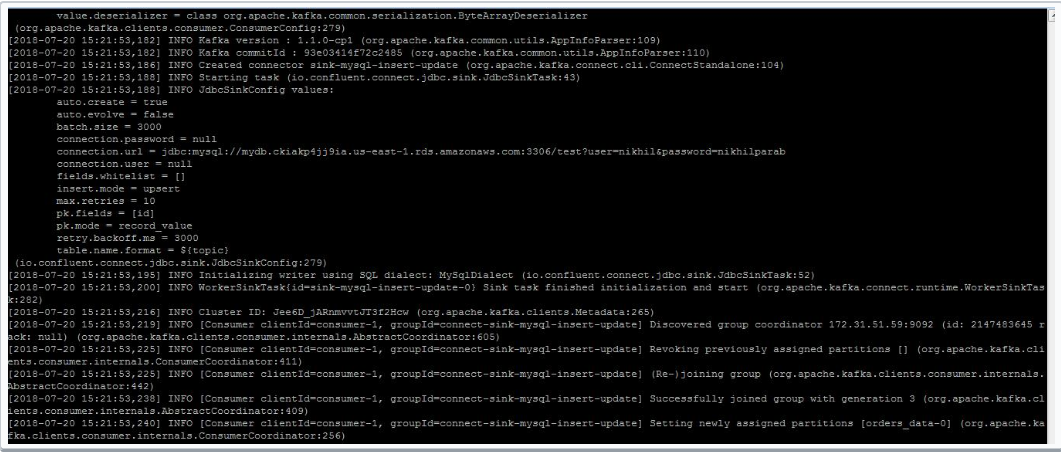
- Open another terminal for same server as above and start avro console producer
$cd  confluent-4.1.0/bin

$ ./kafka-avro-console-producer \--broker-list x.x.x.x:9092 --topic orders_data \--property    value.schema='{"type":"record","name":"myrecord","fields":[{"name":"id","type":"float"{"name":"PARTY_TYPE_ID","type":"float"},{"name":"PARTY_DESCRIPTION", "type": "string"},{"name":"PARTY_SHORT_DESCRIPTION", "type": "string"},{"name":"SOURCE_SYSTEM","type": "string"},{"name":"CREATED_DATETIME", "type": "string"}{"name":"MODIFIED_DATETIME","type":"string"}]}'
It will get hang for some time. You have to enter the values as follow
{“id”: 1,”PARTY_TYPE_ID”:100,”PARTY_DESCRIPTION”: “PERSONAL” ,”PARTY_SHORT_DESCRIPTION”:”S”, “SOURCE_SYSTEM”:”sys”,”CREATED_DATETIME”:”2018-07-05”, “MODIFIED_DATETIME”:”2018-07-09”}
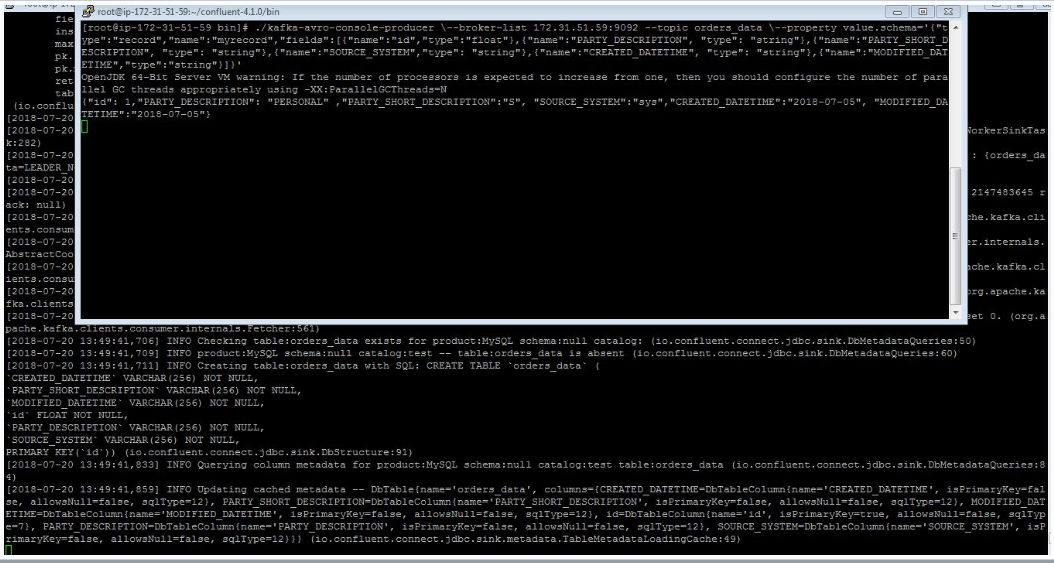
- The table will get create(same as topic name) in mysql. Start the mysql on other server
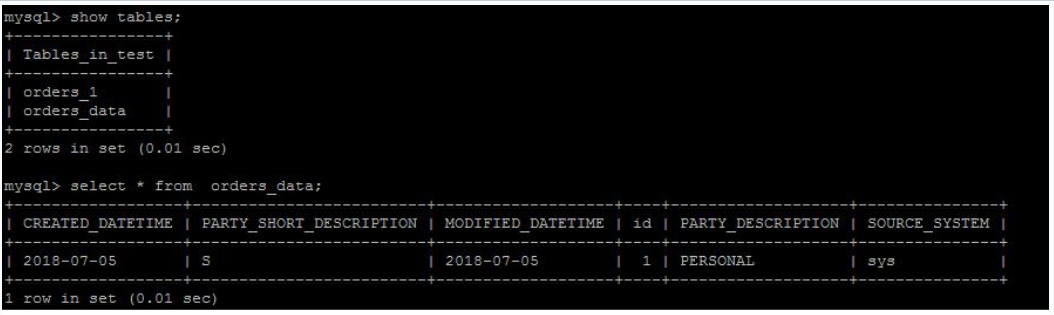
- You can update the data. Insert the different value for same id. You can see the value get updated in mysql
e.g. Original value of MODIFIED_DATE for id 2 is 2018-07-06
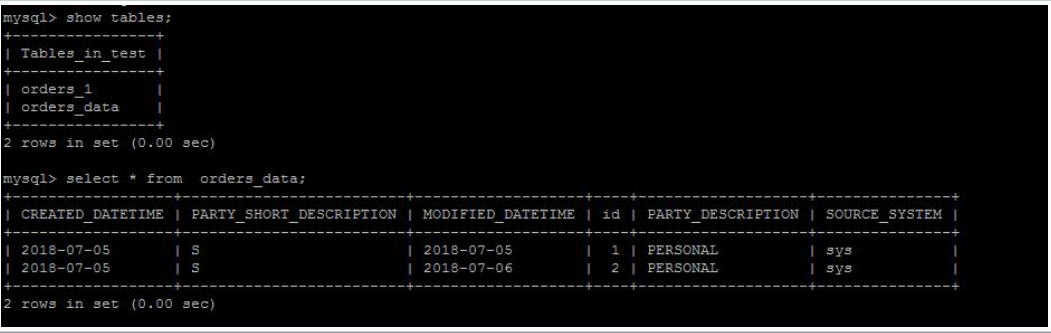
- Updated value